 Plando
Say it all at once
Plando works out what is a task, what is shopping and what is a note, and puts each in its place.
Said: “call the bank tomorrow at ten and buy milk”
- Task
- Money
- Tomorrow, 10:00
- Shopping
Said: “take out the trash every Monday at 8”
- Task
- Home
- Every Monday, 08:00
- Repeats
Said: “idea: give Olya a book”
- Note
- Family
No need to pick a task or a note: the card is saved right away, and you can fix it later.
Here’s what it looks like
The same Plando on your phone and your PC. On the PC, a sidebar, the list and the card side by side; on the phone, everything under your thumb.
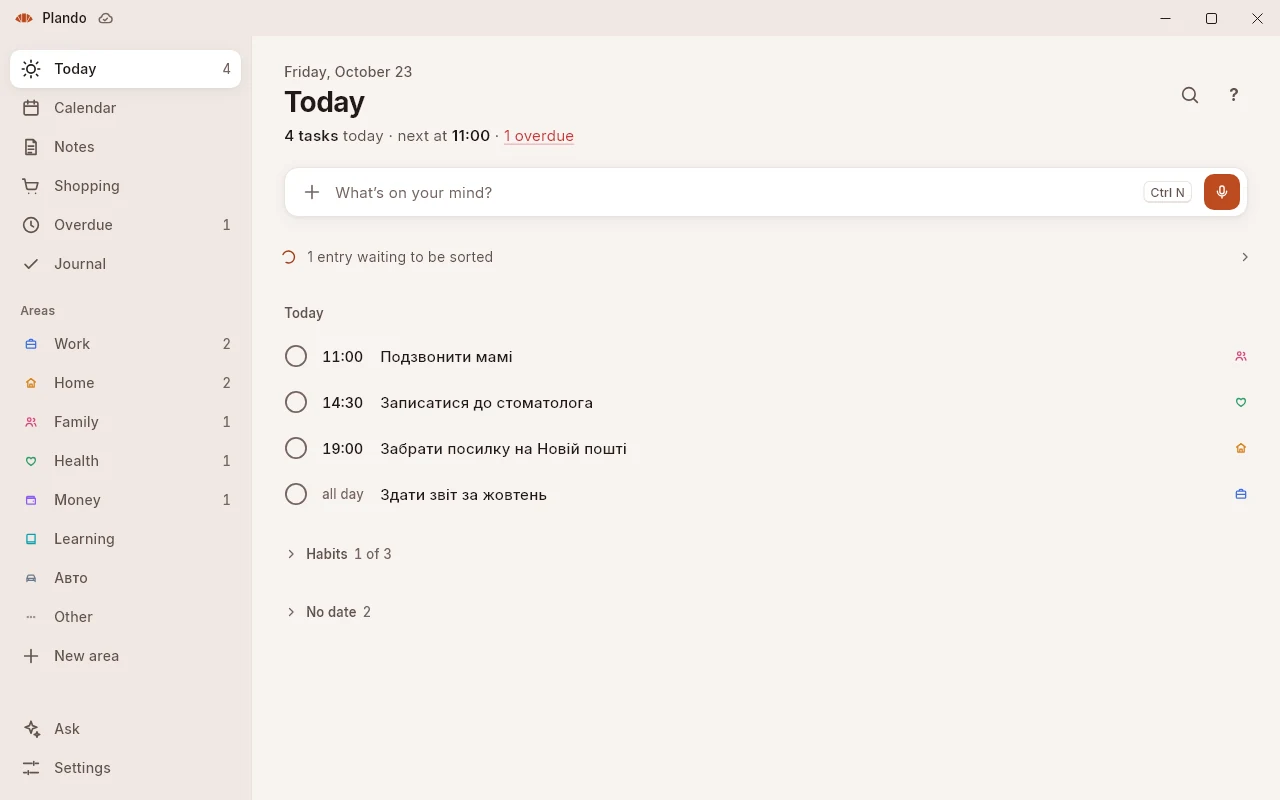
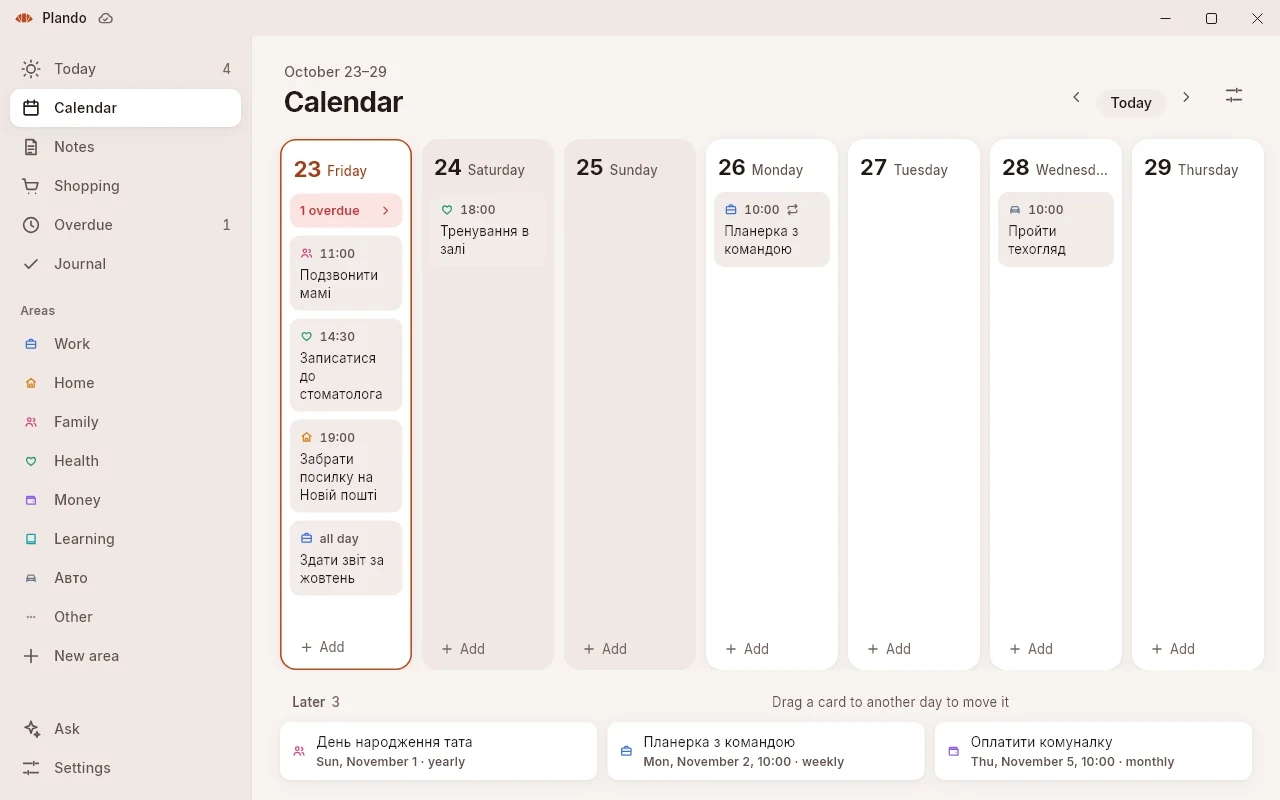
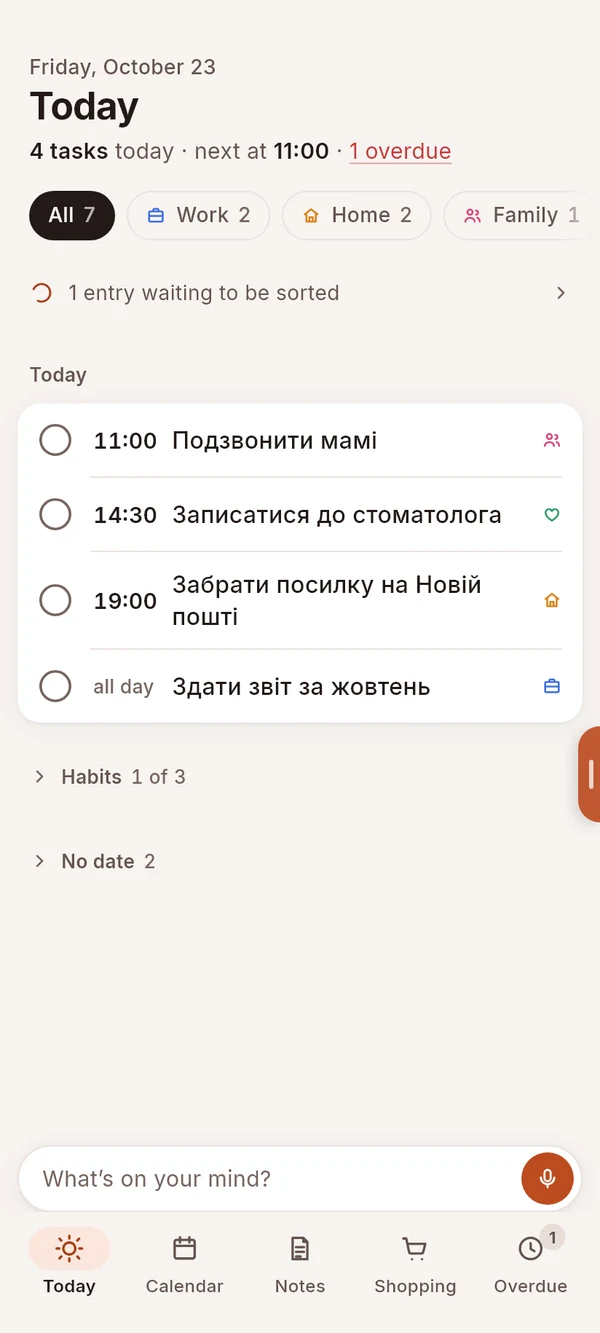
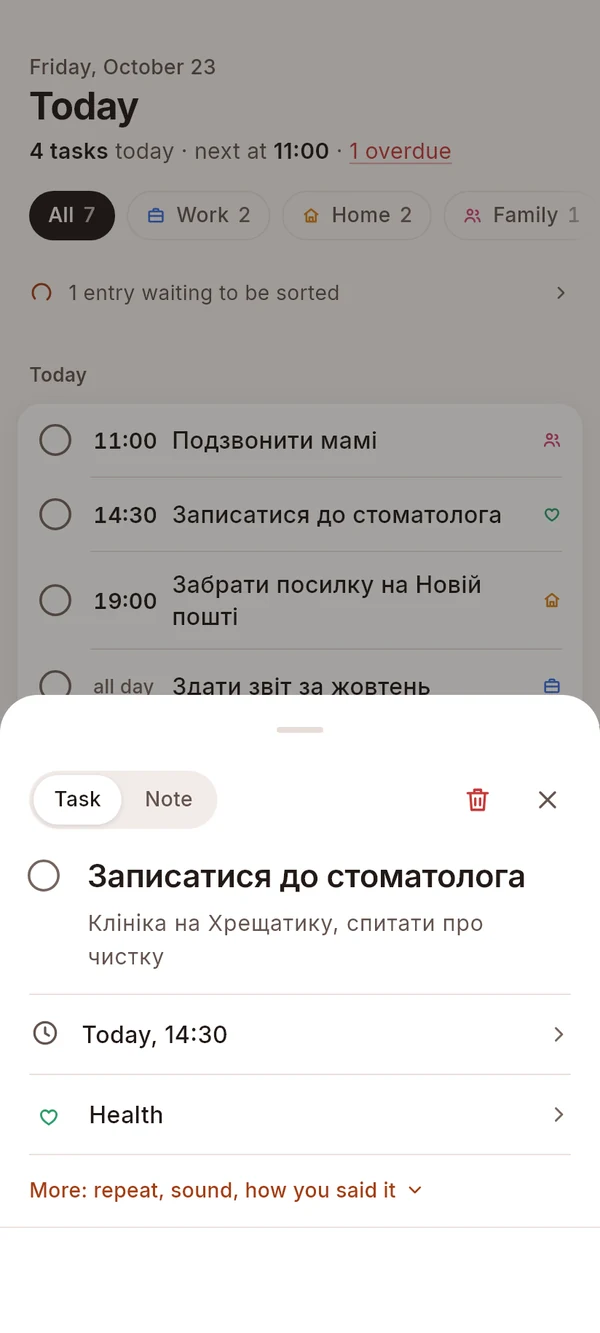
A replay of Plando’s interface, with demo cards.
Write it down where it comes to mind
On your phone
- Hold the bubble and speak Plando’s button floats over other apps. Or tap it, and it listens until you pause.
- Say «Окей, Пландо»and then the thought. Turn the words on in Settings; the phone itself listens for them, offline.
- Sharetext, a link, a photo or a file from any app.
- Select textand pick Plando in the menu: the selection becomes a note.
- A tile, a widget or the assistantWrite it down from the quick settings, from the home screen, or with Plando in place of Google Assistant.
On your PC
- Hold the right Alt and speak Let go, and the card is there. Plando lives in the tray, out of your way.
- Press the right Ctrl and typethe way you think: “take out the trash every Monday at 8”.
- Press the right Ctrl twiceand the text selected in any app becomes a note.
You can also forward a message, a voice note, a photo or a file to Plando’s Telegram bot: several messages in a row become one card.
What you write down on your phone shows up on your PC a moment later, and the other way round. It works offline too: everything syncs once you’re back online.
Reminds you, then once more
The reminder comes on time, and if you missed it, once more an hour later. A task for a day with no exact time reminds you three times. And every morning at 8 Plando shows the plan: what’s on today and what’s overdue.
Plando also does
Shopping on its own
Say “buy milk and bread”, and two items appear on the shopping list.
Notes with formatting
Headings, checklists, links and code: write them as plain text.
Ask
Ask by voice or text “what do I have on Friday?”, and Plando answers from your cards.
Morning plan
Every morning at 8, a quiet notification: what’s on today and what’s overdue. You choose the time.
Habits
Daily tasks gather in their own line on Today, so they don’t get lost among the rest.
Attachments
Photos and files via Share, Telegram or pasted on the PC. Voice notes play right in the card.
Android widgets
Five widgets: Today, Record, Notes, One note and Shopping.
Keys on the PC
Right Alt to dictate, right Ctrl to type, Ctrl + K for the command palette. All of them can be changed.
Six colour themes
Classic, Blue, Sage, Sand, Lavender and Graphite, each light and dark.
Your Claude or ChatGPT sees your tasks
Connect your own Claude or ChatGPT to Plando, then ask about your tasks or have it add something, right in the chat.
- It sees your tasks, notes and shopping, with the names of attachments.
- It can create and change cards, but it doesn’t delete them or see the files themselves.
- Connect and disconnect: Settings → Account → “Claude and ChatGPT”.
Your data
- No ads, no analyticsPlando shows no ads and doesn’t track how you use it. When the app fails, it sends only the kind of error and where in the code it happened, none of what you wrote.
- A server in FrankfurtYour cards are kept in Supabase in Frankfurt, so your phone and your PC see the same thing.
- AI sees only what it needsText or sound goes to OpenAI only to turn it into a card or to answer your question. Under OpenAI’s rules, API data isn’t used to train models.
- Delete everything any timeIn the app: Settings → Account → “Delete account”. Your account, cards and files are gone at once, for good.
Frequently asked questions
Tap a question, and Plando answers.
Do I need an account?

You can write things down without one: the cards are kept on the device. But Plando can only parse your phrases and sync your phone with your PC once you have an account.
Sign in with a code sent to your email or with Google; there are no passwords. Whatever you wrote down before signing in gets parsed after.
How much does Plando cost?
Plando is free right now. If paid features come later, what’s there today stays free.
Does it work offline?
Yes. Whatever you type or say is saved at once and parsed as soon as you’re back online. Reminders come without internet too.
Will it remind me if Plando is closed?
Yes: the system itself holds the reminders, so they come with the app closed, and on Android even after the phone restarts.
If you force-stop Plando in Android’s settings, reminders come back when you open it again. On Android 12 and newer, allow “Alarms & reminders”, or they can be up to 10 minutes late.
How does «Окей, Пландо» work? Is it always listening?
The wake words are off until you turn them on in Settings, and they only work while Plando’s bubble is on the screen. The phone itself recognizes them, offline, and sends nothing anywhere before them. You can let it listen with the screen off or only while charging. Android only, for now.
Which languages does Plando understand?
The app is in Ukrainian and English. Voice recognition is tuned for these two languages, but understands others too.
Which devices does it run on?
Android 7 and newer, and Windows 10 and 11 (64-bit). There is no iPhone, Mac or browser version yet.
How do I connect my phone and my PC?
Sign in to the same account on both: cards sync within seconds, and without a connection they wait and catch up later.
Who sees what I write?
You do. To turn a thought into a card, OpenAI briefly gets the text or sound, and models aren’t trained on it. It’s all spelled out in the privacy policy.
How do I delete my account?
In the app: Settings → Account → “Delete account”. Without the app, by email. Details on the Delete your account page.
When will Plando be on Google Play?
Soon. For now you can install it on Windows.
Get Plando
Windows
Download for WindowsWindows 10 and 11, 64-bit.
How to install
- Download
Plando-Setup.cmdand run it. - If Windows warns about an unrecognized app, open the details in the warning and run the app from there.
- Allow changes to your device once: this is how Plando adds its certificate, so Windows trusts the package.
- Plando installs and opens. After that it updates itself.
Android
Coming soon to Google Play
Android 7 and newer.